What is Pyllments?
Build Modular, LLM-Powered Applications with Ease.
uv pip install pyllmentsPyllments is a Python library that empowers you to build rich, interactive applications powered by large language models. It provides a collection of modular Elements, each encapsulating its data, logic, and UI—that communicate through well-defined input and output ports. With simple flow-based programming, you can effortlessly compose, customize, and extend components to create everything from dynamic GUIs to scalable API-driven services.
It comes prepackaged with a set of parameterized application you can run immediately from the command line like so:
pyllments recipe run branch_chat --height 900 --width 700Elements:
- Easily integrate into your own projects
- Have front end components associated with them, which allows you to build your own composable GUIs to interact with your flows
- Can individually or in a flow be served as an API (with limitless endpoints at any given part of the flow)
Chat App Example
With history, a custom system prompt, and an interface.
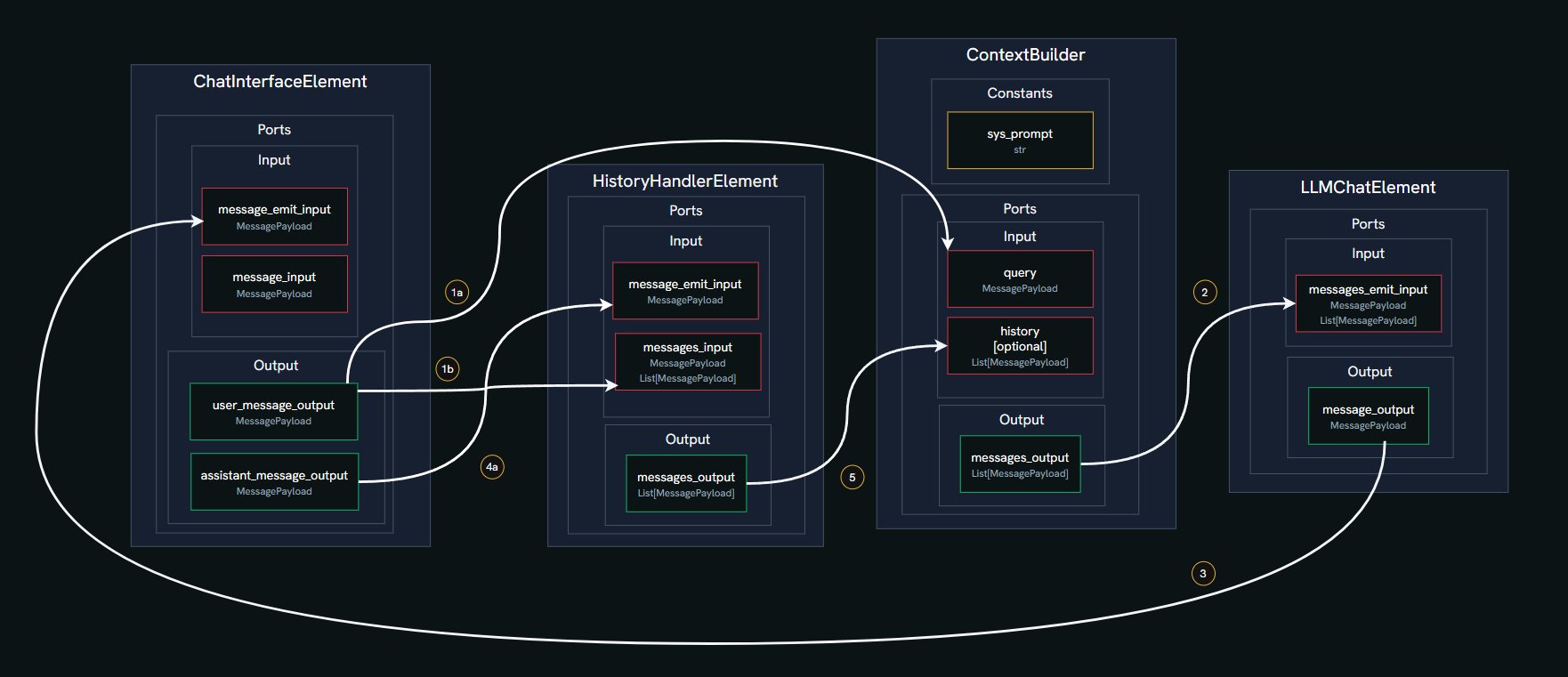
In this example, we’ll build a simple chat application using four core Elements from the Pyllments library. Elements are modular components that handle specific functions and connect via ports to form a data flow graph.
ChatInterfaceElement
Manages the chat GUI, including the input box for typing messages, a send button, and a feed to display the conversation. It emits user messages and renders incoming responses.HistoryHandlerElement
Maintains a running log of all messages (user and assistant) and tool responses. It can emit the current message history to be used as context for the LLM.ContextBuilderElement
Combines multiple inputs into a structured list of messages for the LLM. This includes a predefined system prompt (e.g., setting the AI’s personality), the conversation history, and the latest user query.LLMChatElement
Connects to a Large Language Model (LLM) provider, sends the prepared message list, and generates a response. It also offers a selector to choose different models or providers.
Here’s what happens step by step in the chat flow:
- User Input: You type a message in the
ChatInterfaceElementand click send. This creates aMessagePayloadwith your text and the role ‘user’.
- History Update: Your message is sent via a port to the
HistoryHandlerElement, which adds it to the conversation log.
- Context Building: The
ContextBuilderElementreceives your message and constructs the full context. It combines:- A fixed system prompt (e.g., “You are Marvin, a Paranoid Android.”),
- The message history from
HistoryHandlerElement(if available, up to a token limit),
- Your latest query.
- A fixed system prompt (e.g., “You are Marvin, a Paranoid Android.”),
- LLM Request: This combined list is sent through a port to the
LLMChatElement, which forwards it to the selected LLM (like OpenAI’s GPT-4o-mini).
- Response Handling: The LLM’s reply is packaged as a new
MessagePayloadwith the role ‘assistant’ and sent back to theChatInterfaceElementto be displayed in the chat feed.
- History Update (Again): The assistant’s response is also sent to the
HistoryHandlerElement, updating the log for the next interaction.
- Cycle Repeats: The process loops for each new user message, building context anew each time.
chat_flow.py
from pyllments import flow
from pyllments.elements import ChatInterfaceElement, LLMChatElement, HistoryHandlerElement

# Instantiate the elements
chat_interface_el = ChatInterfaceElement()
llm_chat_el = LLMChatElement()
history_handler_el = HistoryHandlerElement(history_token_limit=3000)
context_builder_el = ContextBuilderElement(
    input_map={
        'system_prompt_constant': {
            'role': "system",
            'message': "You are Marvin, a Paranoid Android."
        },
        'history': {'ports': [history_handler_el.ports.message_history_output]},
        'query': {'ports': [chat_interface_el.ports.user_message_output]},
    },
    emit_order=['system_prompt_constant', '[history]', 'query']
)
# Connect the elements
chat_interface_el.ports.user_message_output > history_handler_el.ports.message_input
context_builder_el.ports.messages_output > llm_chat_el.ports.messages_input
llm_chat_el.ports.message_output > chat_interface_el.ports.message_emit_input
chat_interface_el.ports.assistant_message_output > history_handler_el.ports.message_emit_input

# Create the visual elements and wrap with @flow decorator to serve with pyllments
@flow
def interface():
    width = 950
    height = 800
    interface_view = chat_interface_el.create_interface_view(width=int(width*.75))
    model_selector_view = llm_chat_el.create_model_selector_view(
        models=config.custom_models,
        model=config.default_model
        )
    history_view = history_handler_el.create_context_view(width=int(width*.25))

    main_view = pn.Row(
        pn.Column(
            model_selector_view,
            pn.Spacer(height=10),
            interface_view,
        ),
        pn.Spacer(width=10),
        history_view,
        styles={'width': 'fit-content'},
        height=height
    )
    return main_view
CLI Command
pyllments serve chat_flow.pyFor more in-depth material, check our Getting Started Tutorial
Elements are building blocks with a consistent interface
Elements can create and manage easily composable front-end components called Views
Using their Ports interface, Elements can be connected in endless permutations.
Attach API endpoints to any part of the flow
Key Features:
Modular Architecture: Build applications using interconnected Elements, each containing its own business logic and visualization components.
Reactive Design: Utilizes the Param library for reactive programming, ensuring seamless updates between models and views.
Visualization Support: Leverages the Panel library for creating interactive web-based user interfaces.
LLM Integration: Easily incorporate Large Language Models into your applications.
Flexible Connectivity: Elements communicate through input and output ports, allowing for complex data flows. Payload System: A versatile payload system for handling various types of data, including text, images, and audio.