Discord Chat
pyllments recipe run discord_chatTo chat with the bot, you must create it through the Discord Developer Portal and add the bot to your server. Once you and the bot share a server, you may message it directly and it will respond to you.
Configuration
| Argument | Description | Default |
|---|---|---|
| bot_token | The token for the discord bot. Not necessary if DISCORD_BOT_TOKEN env var present. | None |
| model_name | The name of the LLM model to use for generating chat responses. | gpt-4o-mini |
| model_base_url | Base URL for the LLM API endpoint. | None |
| system_prompt | Optional system prompt to guide the conversation. | None |
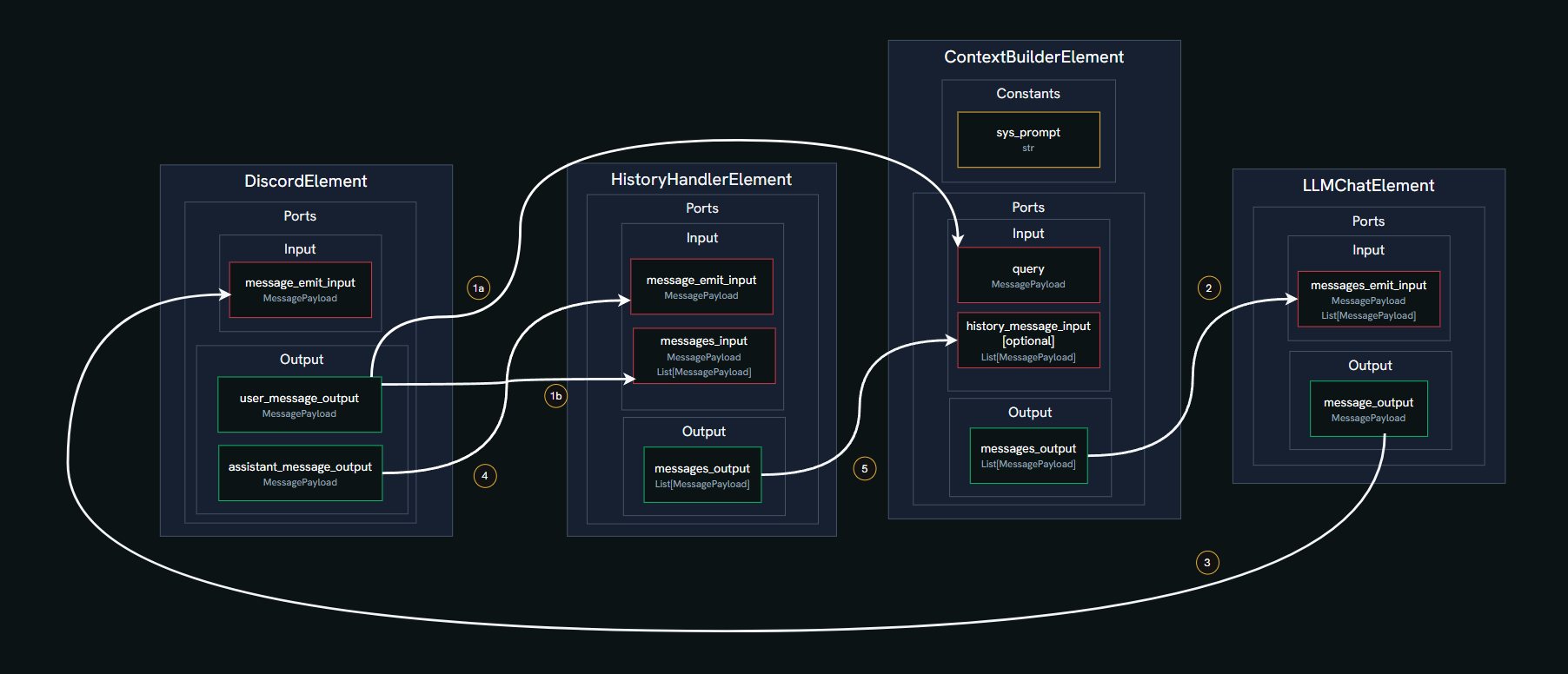
Steps of the flow
When a message arrives from the Discord channel, it is packaged into a
MessagePayloadand emitted from theuser_message_outputport of theDiscordElement1a. It is emitted to the
queryport of theContextBuilderElement1b. as well as to the
messages_inputport of theHistoryHandlerElementWhen the
queryport of theContextBuilderElementis filled, it generates and emits alist[MessagePayload]to theLLMChatElement, which may or may not include the history, depending on whether it is present or not.The
LLMChatElementreceives the payloads at itsmessages_emit_inputport, then generates a response callback, and packs it in aMessagePayloadwhich is emitted from itsmessage_outputport and received back by theDiscordElement, which appears as a response from the bot in the channel after the actual call to the LLM is made to generate the content of the message.When the message arrives at the
message_emit_inputport of theDiscordElementand after the content is generated, it is then forwarded to themessages_emit_inputport of theHistoryHandlerElement, where it is saved into its internal storage.The
HistoryHandlerElementthen emits alist[MessagePayload]to theContextBuilderElement. This process allows us to populate the history of theContextBuilderElementdynamically. (Note that this doesn’t trigger it to emit a list of messages, only thequeryport is responsible for that.)